FREE Shipping for Ksh. 10,000+ orders

10%+ Discounts for you

Free Shopping Coupons


We have made online shopping easier by allowing our customers to shop through well planned categories. This is where you can select the most preferred category according to your motive of shopping and pick the best products available in that category.
The categories hold products from various brands but of the same category, filtering out other products that don’t belong to that category. This allows you to browse through the most preferred products comparing features and prices from different brands, which makes shopping easier and a fun experience.
We will take you through the various ways in which you can find the categories, the various products displayed in those categories and how to find the best products that suit your needs within the categories. We had already covered How to shop through brands in Incredible store on the previous article. Read more to find out on how to shop through categories in Incredible Store.
There are two main ways in which you can find the categories section in Incredible Store. The first option is by going to the Homepage then hovering on the Homepage link on the website header. A drop down will appear displaying the four main categories that we have. That will be visible on any page that you visit in our website.
The second option is by scrolling down the Homepage where you will find the four categories displayed just after the brands column. Each category will display a photo, name of the category and the number of products available in that category.
On mobile you can find the categories section by clicking on the Menu Link at the top left corner of the screen, then a window will appear showing three options for Search products, Menu of pages and categories section. Click on the categories section and all the categories will be displayed on a window that will appear.
We have four main categories in Incredible Store, which are;
1. Men
2. Women
3. Kids
4. Accesories
The Men category holds all the items that are available for men. The Women category holds all the items that are available for Women. Then the Kids category holds all the items that are available for Kids. The Accesories category holds all the other items that complement footwear, clothing and apparel which includes Bags and Jewellery.
The accesories category will also include Wall arts which are available in Incredible store. These Wall arts are Canvas Wall arts and Board Wall arts made in various shapes and sizes.
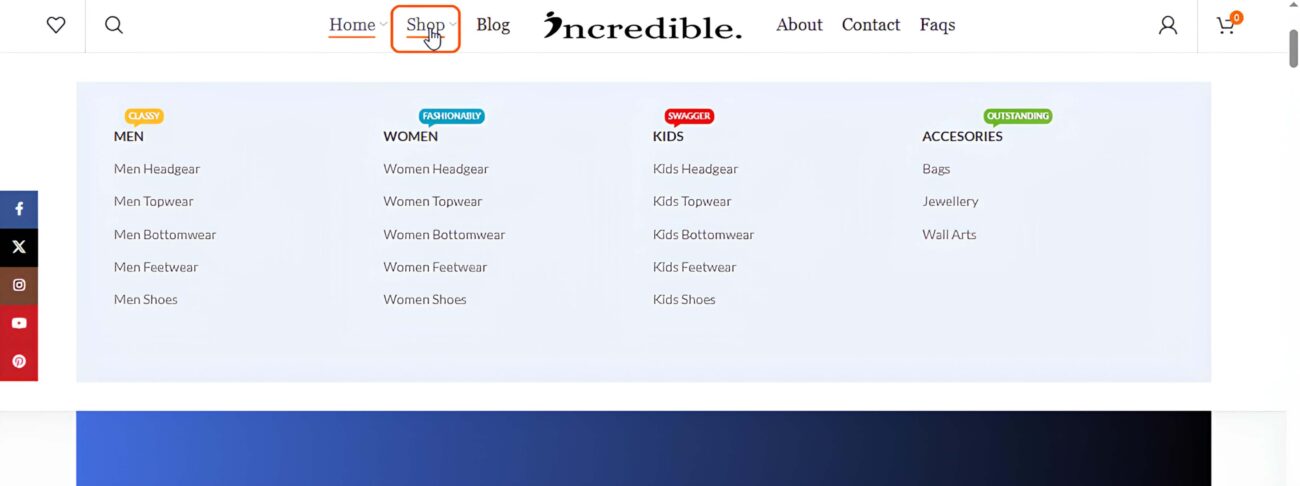
Each main category has a several sub-categories to help shoppers to easily narrow down to the particular product they are looking for. The first three categories have the same sub-categories which support the main category in displaying products that are of the same kind.
The sub-categories can be found by hovering on the shop page link located on the header of the website. The header can be seen on any page visited in the website. A drop down window will appear which is known as a mega menu displaying all the sub-categories that we have in each main category.
The sub-categories within the first three categories are;
a. Head Gear
b. Top Wear
c. Bottom Wear
d. Feetwear
e. Shoes
The Head Gear sub-categories will display headgears for each particular category. The Top Wear sub-category will display topwear from each particular category. The Bottom Wear sub-category will display bottomwear for each particular category. The Feet Wear category will display feetwear for each category while the Shoes sub-category will display shoes for each particular category.
To shop through categories in Incredible Store, you click on the most preferred category then you will be redirected to the shop page where products from that particular category will be displayed. The products displayed will be from all the brands that are available in Incredible Store.
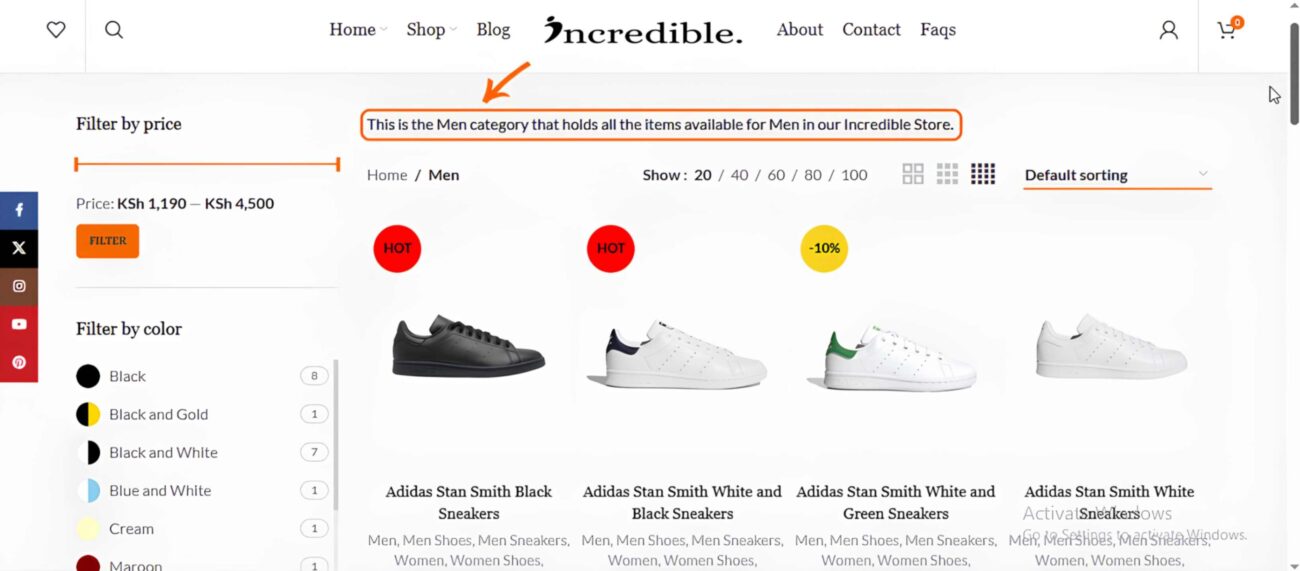
Products that are regarded as Unisex products which both men and women can wear, will be displayed in more than one category. For example, sneakers that can be worn by both men and women like Nike White Air force 1 Sneakers, will be displayed on the Men shoes sub category and also on the Ladies shoes sub category.
On the left side of the shop page there will be a side bar with more options to help you filter through products in order to narrow down to the most preferred products. Above the products displayed there will be more options which can be used in sorting out the products such as sort by popularity, sort by average rating, sort by latest product and sort by price either from low to high or high to low.
Categories will help you to quickly find products that you are looking for and save you time and energy that you would have used to go through all the products in order to find the most suitable products that suit your needs. Quickly click the most preferred category and browse through products displayed on the various pages.
While browsing through the products also check for products which have a yellow label on them with a sale percentage. These are products which are on sale, take advantage of the sale products by purchasing the products and enjoy the percentage discounts displayed. This will also save you some money.
You can also add the products to the Compare page where you can compare different aspects of different products like prices and features. The wishlist option will also be available on each product where you can products to the Wishlist page and save them for future purchase.
Here are the various ways in which you can shop through categories in Incredible Store. The four main categories will help you to quickly narrow down your search for products and the sub-categories will also take you a step further towards finding the products that suit your shopping needs.
Make use of the filtering options provided on the left side bar to help you find suitable products quickly and also the default sorting option at the top of the products displayed will make even your work easier. Shop today in Incredible Store and get the products that you’re looking for by selecting the most preferred category.
No account yet?
Create an Account